

Grow cold email replies up to 13%
ALTE Outreach turns your prospect base into personalised cold emails. It analyses each company, connects your offer to its business context, generates personalised messages and sends them from a mailbox you own, tracking campaign results in one workflow.
- 1Base
- 2Research
- 3Draft
- 4Replies
Prospect base · your own list
- CloudScalecloudscale.comImported
- Northwind Freightnorthwind.coImported
- Helio Energyhelio.energyImported
- + more companies in this campaign
Uploaded as a CSV, or connected from a source you already use.
Company research · cloudscale.com
- Series B funding
- Pipeline acceleration
- Hiring an outbound team
Business context and relevant signals, read before writing.
Ideas to accelerate CloudScale’s pipeline
Hi Sarah,
I noticed CloudScale is investing in pipeline acceleration and scaling its outbound engine.
ALTE Outreach analyses each account and writes from that company's own context, so your team spends its time on the replies.
Open to a quick 15-minute chat next week?
From company research · cloudscale.com
- Series B funding
- Pipeline acceleration
- Hiring an outbound team
Nothing is sent until you approve the draft.
Latest inbound · replies and unsubscribes
- Sarah Lee · CloudScaleReplied
- Mark Ellis · Northwind FreightReplied
- Ana Ruiz · Helio EnergyUnsubscribed
Replies are recognised by sender address among the companies in your base, for mailboxes connected through Microsoft.
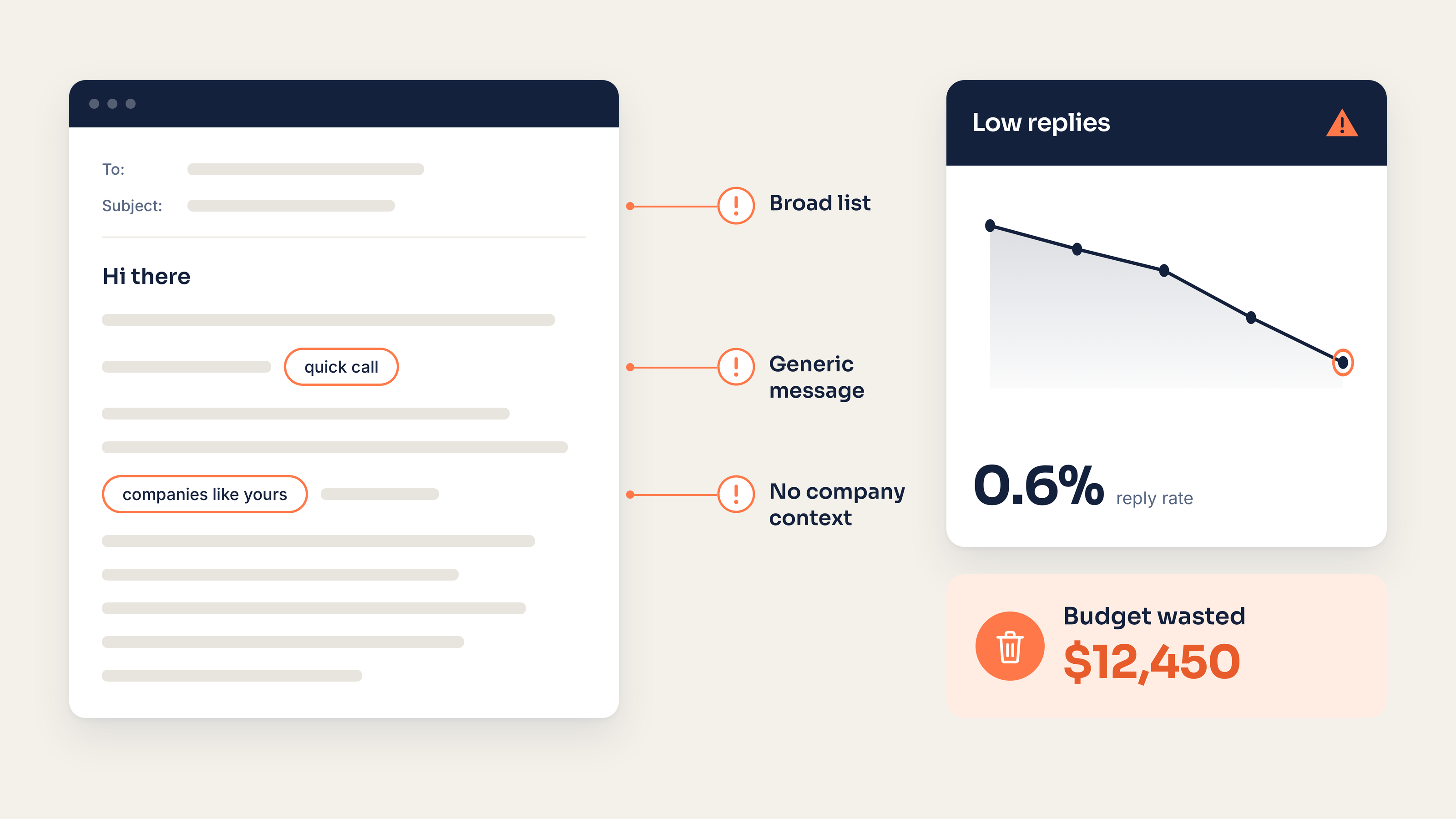
Cold outreach fails before the email is written.
Most campaigns start with a broad list, a generic template and a sending tool. The message goes out before the company context is clear, so even a strong offer can sound interchangeable. ALTE reverses the order: understand the company first, then write.
From prospect base to personalised outreach.
One workflow: map the ICP and offer, import the prospect base, analyse each company, review the personalised emails, then send them from your own mailbox and follow the campaign in one dashboard.
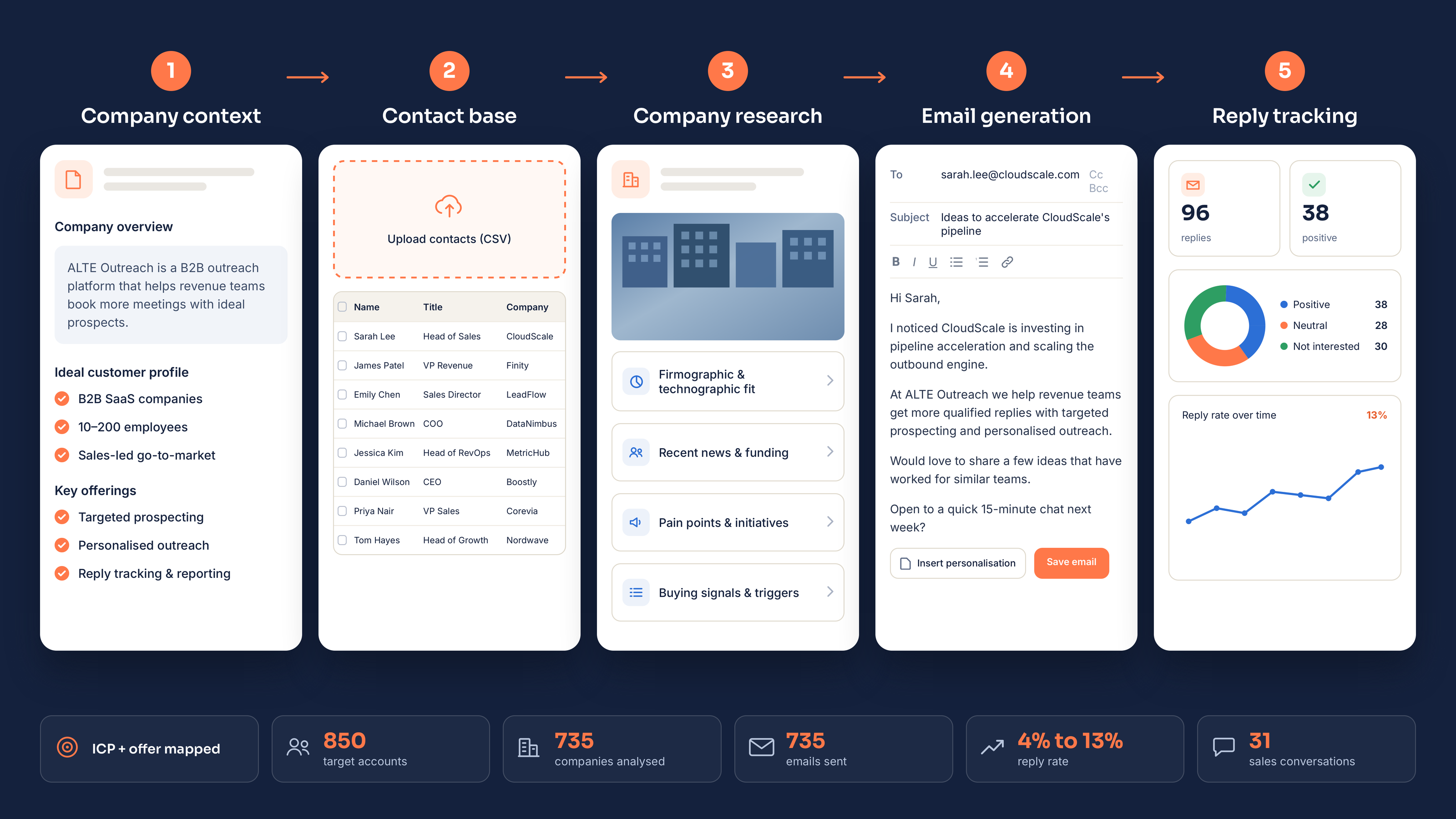
Scroll the image sideways to read the labels.
What the last stage can show depends on how your mailbox is connected — see Connected mailbox below.
The difference is visible in the first lines.
A stronger cold email makes the reason for contacting this company obvious. It uses relevant signals, names a specific business problem and connects the offer to that context without inventing facts.
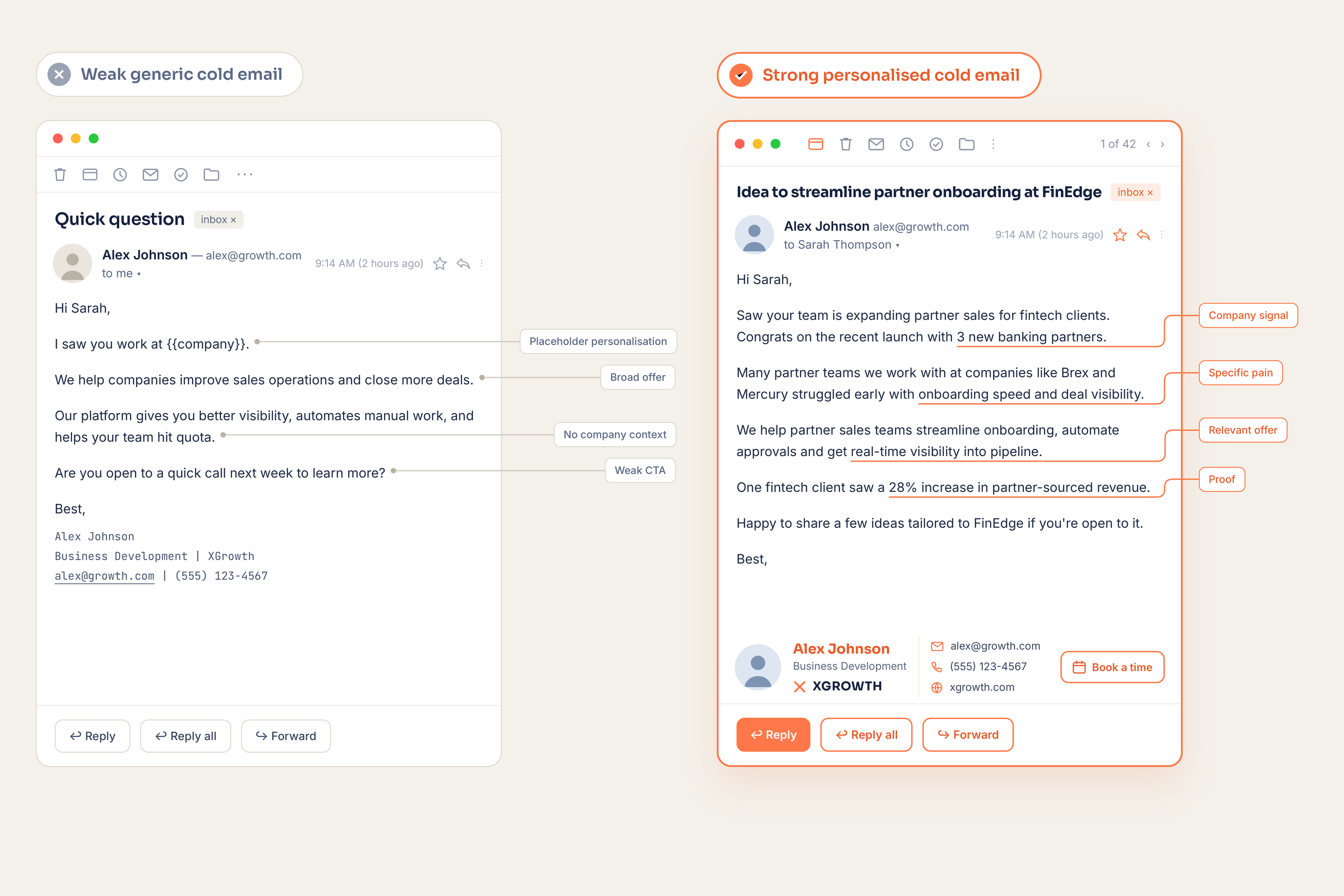
Scroll the image sideways to read the labels.
Plans and pricing for Email Outreach.
Plans scale with the number of AI-analysed and enriched company records, monthly email volume, users and active campaigns. Pay monthly or annually. Annual billing gives you 12 months for the price of 8.
$159/month. Renews monthly until cancelled.
$1,272/year. Renews annually until cancelled.
12 months for the price of 8 — save $636 a year.
One person running the first outbound campaign.
- 1 user
- Up to 1,500 AI-analysed & enriched company records
- 10,000 emails per month
- 1 active campaign
$319/month. Renews monthly until cancelled.
$2,552/year. Renews annually until cancelled.
12 months for the price of 8 — save $1,276 a year.
A small sales team that needs outbound to reach the CRM.
- Up to 3 users
- 5,000 AI-analysed & enriched company records
- 50,000 emails per month
- Up to 5 active campaigns
- CRM integration
$629/month. Renews monthly until cancelled.
$5,032/year. Renews annually until cancelled.
12 months for the price of 8 — save $2,516 a year.
Several teams and segments running at the same time.
- Up to 10 users
- 15,000 AI-analysed & enriched company records
- 150,000 emails per month
- Up to 15 active campaigns
- API and webhooks
Contact Sales Priced by volume, agreed in a contract.
Volumes, sources and terms are agreed with ALTE.
- Users, records and sending volume agreed with ALTE
- Workspaces and integrations scoped with ALTE
- Terms set in the contract
- Onboarding and support
- Security and infrastructure review
- Invoicing and custom terms
All prices are in US dollars (USD). Your bank or card issuer may apply its own currency-conversion charge.
Starter, Growth and Scale include a 7-day trial. The trial includes 1 user, up to 250 company records, up to 300 emails and 1 active campaign. A payment method is collected before the trial starts and $0 is charged during the trial. Enterprise is scoped with ALTE and does not use the standard self-service trial unless agreed separately. See the Trial Terms and the Subscription, Trial & Cancellation Policy.
One dashboard for the whole campaign.
See company analysis, email status, delivery, bounces and replies in one place — without reconciling several tools. Open tracking may be shown where technically available, but it should not be treated as a guaranteed signal.
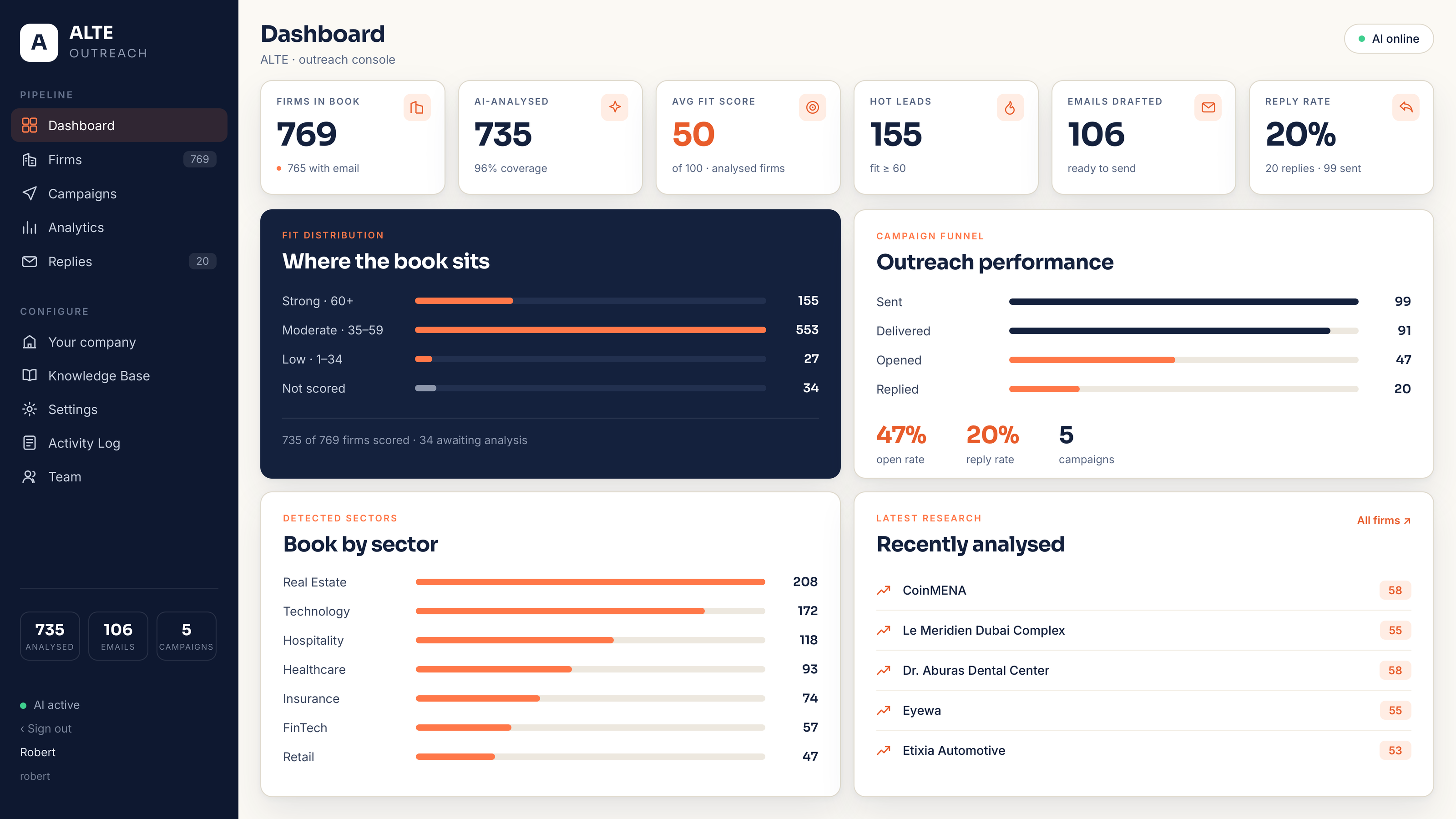
Scroll the image sideways to read the labels.
- Companies in base
- AI-analysed
- Average fit score
- High-fit firms
- Sent / Delivered / Bounced
- Replies
Reply detection and bounce collection work with mailboxes connected through Microsoft; a mailbox connected through Google, or over SMTP, is used for sending only.
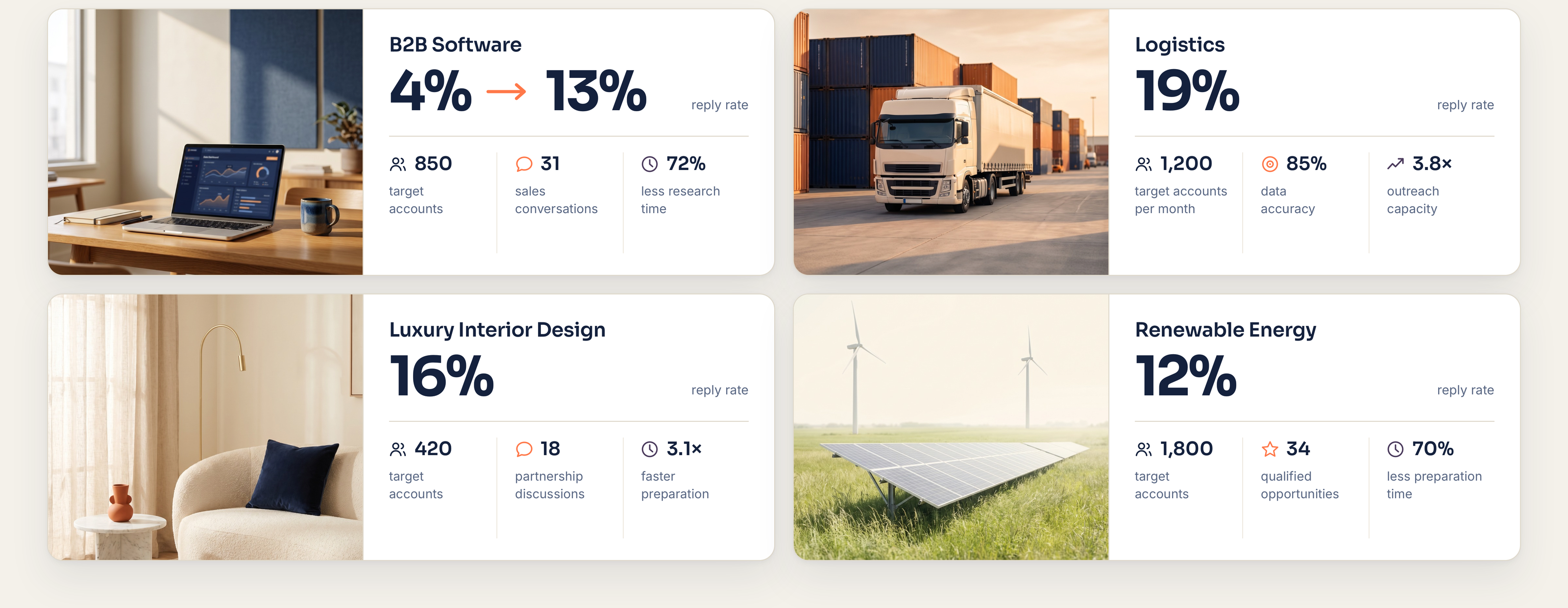
Case Studies
Real results from personalised outreach that gets replies.
Start self-service. Add assisted setup when you need it.
Starter, Growth and Scale are designed for self-service onboarding. Connect your sending mailbox, configure your company and campaign, and start the 7-day trial. Teams that need custom CRM logic, multiple workflows, additional security requirements or enterprise onboarding can work with ALTE on an assisted setup.
Campaigns are sent from your own mailbox.
You connect a mailbox you already own, and ALTE sends your campaign emails from it. Google Workspace and Gmail, Microsoft 365 and Outlook, and mailboxes connected over SMTP are supported. What ALTE is allowed to do with a mailbox depends on the provider.
Google Workspace and Gmail
You connect the mailbox by signing in with Google. ALTE asks for two permissions: permission to send email, used to deliver your campaign messages, and permission to see the email address of the account, used to show which mailbox is connected and to send from the correct address. ALTE does not ask for access to your inbox and does not read messages in a Google mailbox.
Microsoft 365 and Outlook
You connect the mailbox by signing in with Microsoft. The permission Microsoft asks you to approve covers reading the mailbox; ALTE uses it to recognise incoming messages from companies in your prospect base and the delivery failures returned by mail servers. A recognised reply is shown in your workspace and the message it answers is marked as answered; a recipient stops receiving campaign messages when they ask to be unsubscribed.
Any mailbox over SMTP
You connect the mailbox with your own host, port and credentials. An SMTP mailbox is used for sending only; no mail is read from it.
You can disconnect a mailbox at any time in the product settings. On disconnection, ALTE deletes the stored credentials for that mailbox, the replies it stored from it and the bounce notices it stored from it. Two things stay, and the Privacy Policy says why: the record in your own campaigns that a message was answered, and your do-not-contact list. For a Google mailbox, ALTE also revokes the authorisation with Google at that point. Microsoft provides no equivalent interface for an application to revoke its own grant, so for a Microsoft mailbox you, or your tenant administrator, withdraw the authorisation in your own Microsoft account settings. What is requested, stored and deleted is set out in the Privacy Policy.
Where Email Outreach ends, and which ALTE product takes over.
Email Outreach starts from a prospect base you already have and turns it into researched, personalised campaigns. Building that base, and handling the conversations that come back in through your own channels, are separate ALTE products.
Need a new prospect database?
AI Lead Generation finds, analyses and enriches new company and decision-maker data when you do not already have a prospect base.
Need AI to qualify inbound conversations?
AI Lead Qualification handles incoming enquiries across connected channels, follows qualification logic and hands the right conversations to your team.
Questions before your first campaign.
What the product does with your own prospect base, what you need before you start, what you can measure — and what happens at the end of the 7-day trial.
Is this a mass-mailing tool?
No. ALTE Outreach is designed for researched, targeted B2B outreach. The product analyses company context and prepares personalised emails for the prospect base you choose, rather than maximising sending volume.
What do I need to start?
You need a clear offer and ICP, a prospect base to work with, and a sending domain/mailbox you are authorised to use. If you need ALTE to build a prospect database from scratch, use AI Lead Generation.
Can I upload my own prospect base?
Yes. The core Outreach workflow is designed to work with the prospect base you upload or connect, then analyse the companies and prepare the campaign.
Does ALTE find contacts for me?
Email Outreach focuses on researching and activating the prospect base used for the campaign. AI Lead Generation is the separate product for building and exporting a new database of companies and decision-makers.
Can I review emails before sending?
Yes. Drafts remain reviewable and editable, and human approval points can be used before sensitive or high-value communication is sent.
What metrics can I track?
The product can show company-analysis status, emails prepared, sent, delivered, bounced and replies. Opens may be displayed where technically available, but they are not treated as a guaranteed signal. Reply detection and bounce collection work with mailboxes connected through Microsoft; a mailbox connected through Google, or over SMTP, is used for sending only.
Does it work with our CRM?
Growth includes standard CRM integration and Scale includes API/webhooks. Exact connectors and mapping depend on the systems supported at the time of setup.
What happens after the 7-day trial?
If you do not cancel, the trial converts to the monthly or annual plan you selected and the first charge is taken on the date shown before you start. Cancel before the trial ends and no first subscription charge is taken.
Run your first campaign with research behind every email.
Start with your own prospect base, review the company research and personalised drafts, and see the workflow before your first subscription charge.